Automated Evolution Control
 The Automated Evolution Control module adds numerous features to the base modules that, when used together, provide safe, completely automated operation of the dock raising and lowering.
After setting up the dock for a vessel, a simple "one-touch" window controls the basic evolution. Evolution pauses are built in for diver inspection, service installation and removal, etc. (if used), plus the operation can be paused at will at any time by the operator, then continued on the fly as needed.
Manual and Direct control override of each individual valve and pump in the Remote Direct Manual (RDM) control module is integrated so the system knows what items it is able to use, and if an operator takes over control the system reports that and adjusts accordingly. Additional AEC manual modes are added to provide means of taking items out of service.
This automatic operation is coupled with safety checklists that require an operator to confirm any non-standard operating parameters. 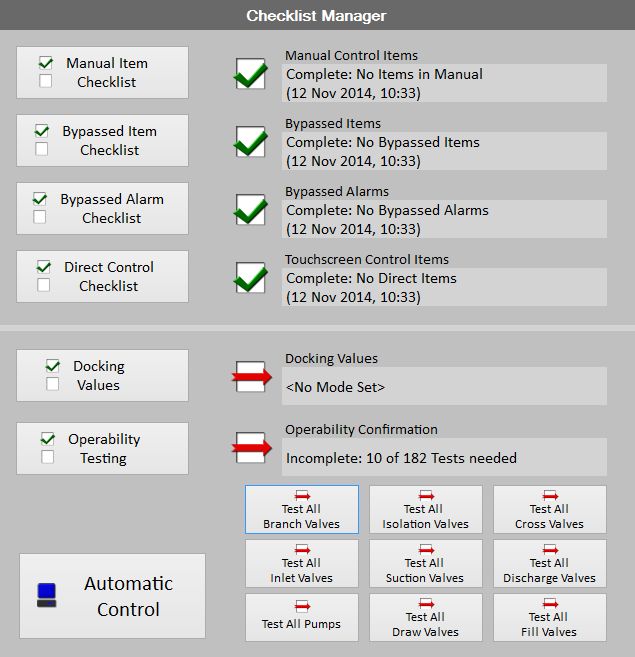
Automated component testing provides assurances that the dock is safe to use.
 Pre-entered ship parameters are used to create a virtual pumping plan which is then offset by the actual status of the dock as reported by the other systems.
 Each of the stages of an evolution (e.g.: transition, trimming, keel touch, etc.) has customized characteristics for any of the modes of operation. During the evolution the status of the dock and the operational step is displayed so that the dock personnel can keep track of what is occurring with details showing remaining distance, next phase, current rate, etc.
The flexibility of screen selection within ADECS3 allows the user to monitor this data or any of the data provided as part of the Attitude and Alarm Monitoring (AAM) module. In a full system with AEC implemented there are over 40 different display panes for the AAM/AEC screens providing several hundred different viewing configurations depending on what the specific user finds to be the most beneficial.